
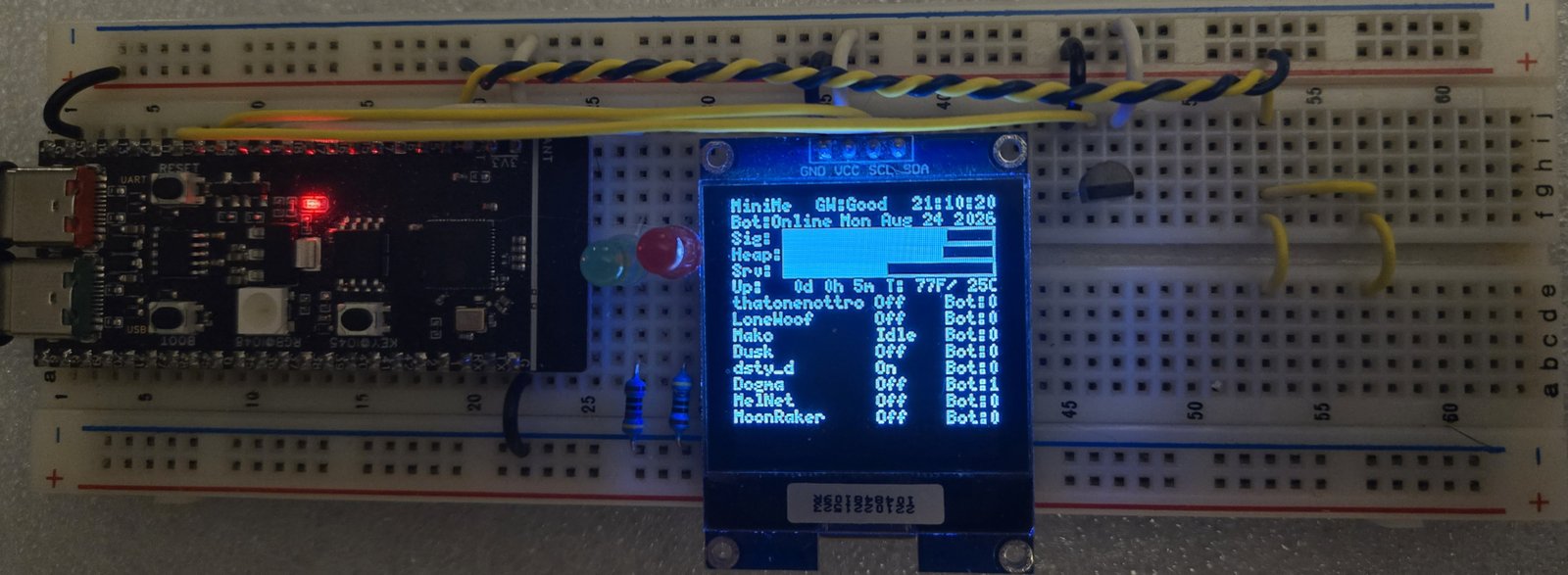
Breadboard prototype: WeAct Studio ESP32-S3-N16R8, 128×128 SSD1327 (GND / VCC / SCL / SDA), two discrete LEDs, GPIO 4 touch wake pad, and DS18B20 on GPIO 10. Sensor fail on the OLED is T:--Error--.
Status: shipped breadboard firmware · v0.5.1 · green CI compile · PCB / desk case still planned.
I find this working well and have not found any bugs. Unless I find something to add to its function, or a bug, this is now shipped code.
After Wi-Fi connects, MiniMe serves a LAN web dashboard at http://<board-ip>/ (Display, SysInfo, LOG, Serial). Theme matches k9dtv.com (light/dark). IC chips: theme (sun/moon) and Display / Log layout.
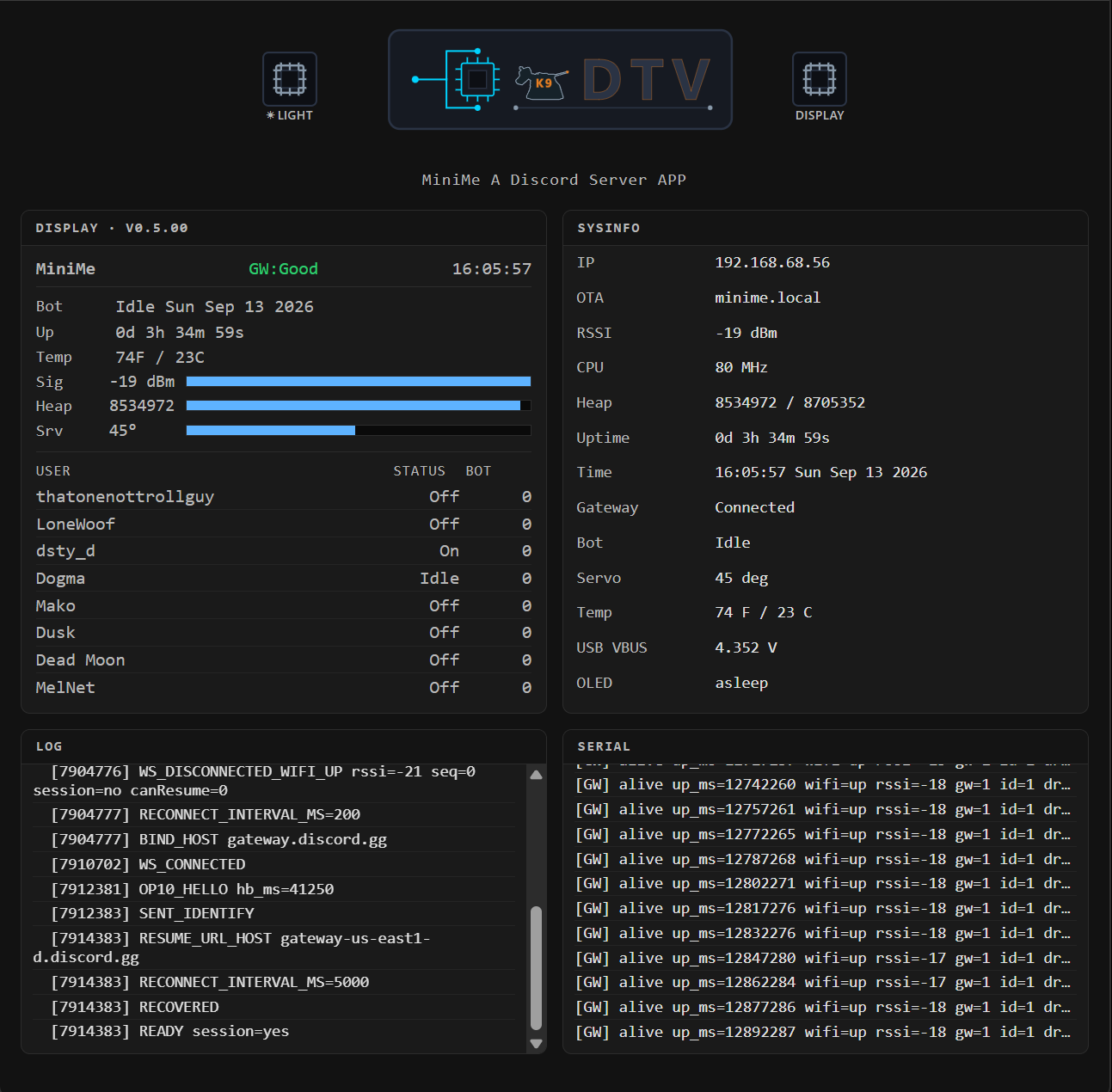
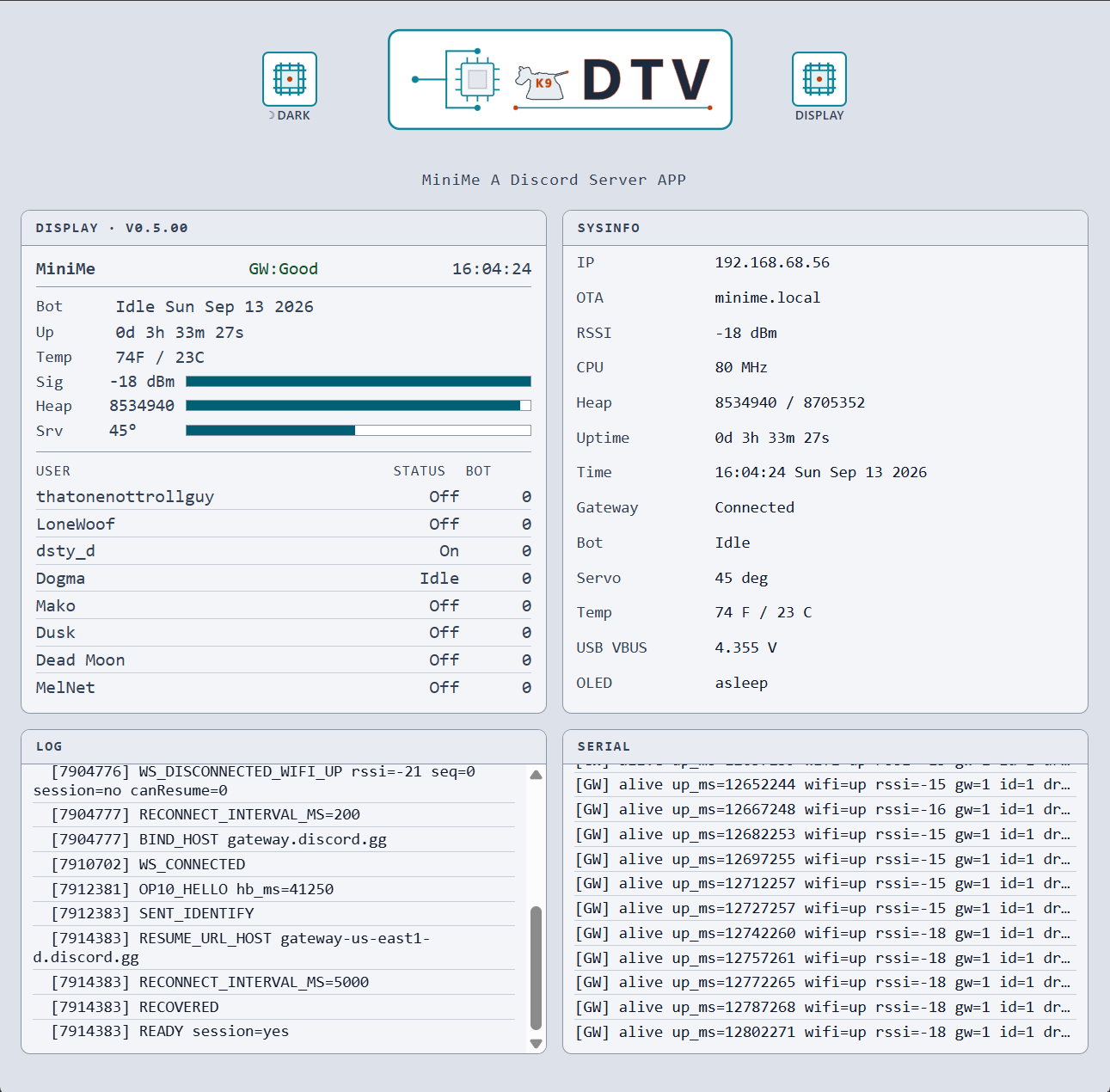
LAN web UI (v0.5.1): light/dark + Display/Log layout chips; Sig / Heap / Srv bars share one left edge and stop at the Display panel edge. SysInfo shows live CPU MHz. Screenshot follows the site theme toggle.
This is my first big modern MCU / Discord bot project on ESP32. AI helped with firmware edits, multi-file layout, and GitHub updates. I owned the architecture, wiring, Discord Gateway/OLED design, commands, power/idle trade-offs, and what shipped on the board.
Ongoing project
Firmware on the GitHub repo is shipped. Hardware and optional extras still on the list:
- Mention / DM indicators on set1 / set2 - DM to the bot turns set1 on; @mention of
OWNER_ID_STRturns set2 on. Owner!clear(or!set1/!set2off) turns them off - PCB and desk case - move off the breadboard onto a custom board and enclosure that can sit on my desk
Done in v0.5.00: Wi-Fi ArduinoOTA (!ota), LAN Display/Log layout.
What this bot can do
Same list Discord shows for !help.
Public commands
DMs, TARGET_CHANNEL_ID, or TARGET_CHANNEL_ID1:
!apod- NASA Astronomy Picture of the Day!ask <question>- DeepSeek text reply in chat!display <text>- payload on OLED rows 15-16 (not the word!display)!help- command list!iss- International Space Station position!news- space / high-tech headlines!physics- latest arXiv physics papers!sys- uptime (d h m s), heap (SRAM + PSRAM), Wi-Fi RSSI, gateway, USB VBUS!ota- Wi-Fi ArduinoOTA info (IP / hostname / port 3232)!temp- indoor DS18B20 temperature!time- bot local time (US Pacific, DST aware)!weather <zip>- US ZIP weather (OpenWeatherMap)
Owner-only
OWNER_ID_STR:
!led on/off/!led <r> <g> <b>- RGB NeoPixel (GPIO 48)!servo <0-90>- servo angle (updates theSrv:bar)!set1 on/!set1 off- digital output pin 1!set2 on/!set2 off- digital output pin 2!clear- turn set1/set2 off
Automatic posts
Sent once to TARGET_CHANNEL_ID after Gateway connects (boot only):
!sysdiagnostics!helpcommand list
No repeating 4-hour sys posts or daily temperature summaries. Commands still work in TARGET_CHANNEL_ID, TARGET_CHANNEL_ID1, and DMs.
Bot Discord presence
- Starts Online when the Gateway identifies
- Goes Idle after 5 minutes with no activity
- Returns to Online on commands and the boot channel announce (touch does not set Online)
How it works
Everything runs on one ESP32-S3. Discord stays in the cloud; MiniMe talks to it over Gateway (websocket) and REST (HTTPS), paints the OLED, serves a LAN web dashboard, and wakes the panel from a touch pad.
Cloud
WeAct ESP32-S3
- Gateway - live link for chat commands, presence, Online/Idle, heartbeats (must not stall during long HTTPS). Heartbeats start after Hello (jittered first send); a missing OP11 ACK before the next interval forces disconnect (
HB_ACK_TIMEOUT). Resume is skipped; onebeginSSLat boot, then library reconnect only (no second bind on drop / OP7 / OP9) - REST - bot posts replies and loads member names; also pulls science/weather/AI over HTTPS/HTTP (
setInsecurefor Discord/API outbound). One sharedWiFiClientSecure;httpsInUseis claimed in the transport (sendDiscordMessage,discordRestGet,httpsGetOpen/httpsRelease) so overlapping HTTPS cannotstop()each other - OLED - always the status board; sleep blanks the panel only (Wi-Fi and Gateway stay up). Sig / Heap / Srv bar fills are computed once in display helpers; the LAN API exposes the same fills as percents (JS only paints width)
- LAN web UI - same board status in a browser at
http://<board-ip>/(Display, SysInfo, LOG, Serial); refreshes about once a second; does not replace OLED. LOG is a 200-line ring with an accurate byte counter; if the next line would push past 20 KB, LOG is wiped then that line is kept. Serial stays a fixed 12-line ring. MmLog feeds the web LOG/Serial panels only (no USB Serial / UART0 traffic) - Touch - wakes the OLED only; does not change Discord status or fire GPIO commands
Why this is hard (on one MCU)
- Discord Gateway heartbeats must keep running while long HTTPS calls (
!ask, weather, NASA) use the same TLS client (httpsInUse+ Gateway deferral while DeepSeek holds it) - Large Gateway JSON lives in PSRAM; small Wi-Fi/TLS buffers must not - wrong placement crashes this board
- OLED can dim and power-save while Wi-Fi and the Gateway stay up (panel sleep ≠ chip sleep)
- Capacitive touch trip point tracks USB VBUS so port sag does not false-trigger or go dead
- Eight live presence rows + 24h command counts share a tiny dashboard with no Serial debug path
OLED dashboard
128×128 SSD1327 status board (U8g2). Font is 5×7 with 1px padding (8px per row).
| Row | Baseline y | What it shows |
|---|---|---|
| 0 | 7 | MiniMe, GW:Good / GW:Bad, time |
| 2 | 15 | Bot Online/Idle; date (right) |
| 3 | 23 | Up:ddd hh mm T:... (days 3-wide, hours/mins 2-wide, spaces; no seconds); fail: T:--Error-- |
| 4 | 31 | Sig: Wi-Fi RSSI bar |
| 5 | 39 | Heap: memory bar (SRAM + PSRAM) |
| 6 | 47 | Srv: servo bar 0-90° |
| 7-14 | 55...111 | Eight user rows: name, presence, command count (24h) |
| 15-16 | 119 / 127 | Command text or !display payload (blank when idle) |
After 1 minute idle the panel dims, then turns off (setPowerSave). Touch on GPIO 4, commands, and the boot channel announce wake it. CPU stays locked at 240 MHz (v0.5.1; no idle downclock when OLED is blank).
Secrets and IDs
Copy MiniMe_Discord_Bot/secrets.example.h to secrets.h and fill in:
#define WIFI_SSID            "ssid"
#define WIFI_PASSWORD        "password"
#define BOT_TOKEN            "bot token"
#define WEATHER_API_KEY      "WEATHER_API_KEY"
#define NASA_API_KEY         "NASA_API_KEY"
#define DEEPSEEK_API_KEY     "DEEPSEEK_API_KEY"
#define BOT_GUILD_ID         "GUILD_ID"
#define OWNER_ID_STR         "OWNER_ID_STR"
#define TARGET_CHANNEL_ID    "TARGET_CHANNEL_ID"
#define TARGET_CHANNEL_ID1   "TARGET_CHANNEL_ID1"
Use #define (not const char*) so every .cpp can include secrets.h without linker errors. IDs are digits only as C strings. OTA password (if used) also lives in secrets.h.
How to get a Discord bot token
- Open the Discord Developer Portal.
- New Application → name it → Create.
- Bot → Add Bot if needed → copy token into
BOT_TOKEN. - Enable Message Content, Server Members, and Presence intents.
- OAuth2 → URL Generator: scope
bot, permissions View Channels, Send Messages, Read Message History → invite to your server.
Owner, channel, and guild IDs
Enable Discord Developer Mode, then:
- Owner ID: right-click your avatar → Copy User ID →
OWNER_ID_STR - Channel ID: right-click text channel → Copy Channel ID
- Guild ID: right-click server icon → Copy Server ID →
BOT_GUILD_ID
Hardware (default pins)
WeAct Studio ESP32-S3-N16R8 (16MB flash, 8MB PSRAM). Display: SSD1327 128×128 I2C.
| Device | GPIO |
|---|---|
RGB NeoPixel (!led) | 48 |
| Servo | 47 |
Digital out 1 (!set1) | 6 |
Digital out 2 (!set2) | 7 |
| DS18B20 data | 10 |
| OLED SDA / SCL | 8 / 9 |
| Touch wake pad | 4 |
| USB VBUS ADC | 1 |
OLED labels: GND, VCC, SCL, SDA. Change pins in minime_config.h if your wiring differs.
Touch wake pad (GPIO 4)
Capacitive pad on GPIO 4 wakes the OLED after dim/off. Connect copper tape or a short wire to GPIO 4; no external pull-up needed. USB VBUS on GPIO 1 (10 kΩ divider) compensates touch thresholds when port voltage sags.
Touch only wakes the OLED - it does not send Discord messages, change Online/Idle, or move GPIO outputs. Serial logging to USB is off (MmLog → web UI only).
Arduino IDE setup
- Install Arduino IDE and the Espressif esp32 board package.
- Open only
MiniMe_Discord_Bot/MiniMe_Discord_Bot.ino(plus the sketch.cpp/.hfiles andpartitions.csv). - Board: ESP32S3 Dev Module; enable USB CDC On Boot (port for upload / OTA; Monitor stays quiet - logs are on the LAN web UI), OPI PSRAM, 16MB flash; use the sketch
partitions.csv(dual OTA apps, no filesystem). - Libraries: WebSockets, ArduinoJson, U8g2, OneWire, DallasTemperature, Adafruit NeoPixel, NTPClient.
- Copy
secrets.example.htosecrets.hand fill in. - Upload. Confirm with Discord
!help, the OLED, andhttp://<board-ip>/.
GitHub Actions compiles the sketch on every push to master (compile check only; does not upload to the board).
Safety
Never commit live bot tokens, API keys, passwords, or Discord snowflake IDs. Reset leaked tokens in the Developer Portal immediately.
Original MiniMe source and docs in the repo are under the MIT License. See LICENSE on GitHub.